Creative Work
Professional Photoshop editing, photo restoration, object removal, and creative image manipulation.
Explore creative services
Photo editing, practical creative tools, and digital design.
An independent creative studio for photo restoration and editing, browser tools, and practical guides — all shaped by hands-on image work.
Boztik began with real Photoshop editing, restoration and creative image work, and grew into a collection of practical browser tools, guides and delivery systems built around the workflows that work actually creates.
Every tool and guide answers a problem that came up while doing real edits — not the other way around.
Photo restoration, retouching, compositing and image editing for personal and business images.
Practical browser tools created around real creative workflows and the problems they actually present.
Editing, tools, guides and secure delivery are all part of the same independent Boztik ecosystem.
Creative work, tools, guides, and the Creative Toolkit — all part of the wider Boztik brand.
Professional Photoshop editing, photo restoration, object removal, and creative image manipulation.
Explore creative servicesPractical browser-first tools for creative workflows, from image analysis to AI creative assistance.
Explore browser toolsUseful notes for photographers, designers, and creators on restoration, retouching and everyday image work.
Browse the guidesThe Boztik browser extension and creative utilities — one product within the wider Boztik ecosystem.
Learn more about the Creative ToolkitWhichever you need, it comes from the same place: real creative and technical craft.
Real editing work, delivered securely — restoration, retouching, and enhancement for photos that matter.
Image Inspector, color and font tools, and an AI Creative Assistant — free, in your browser, for Chrome and Edge.
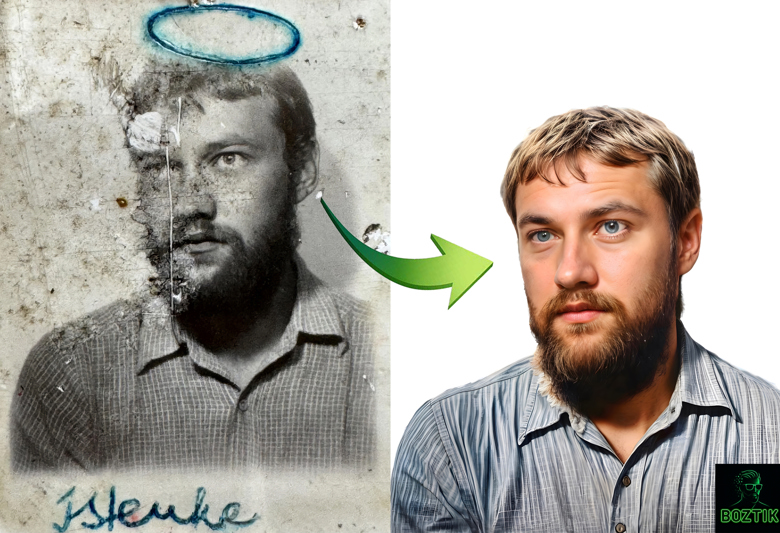
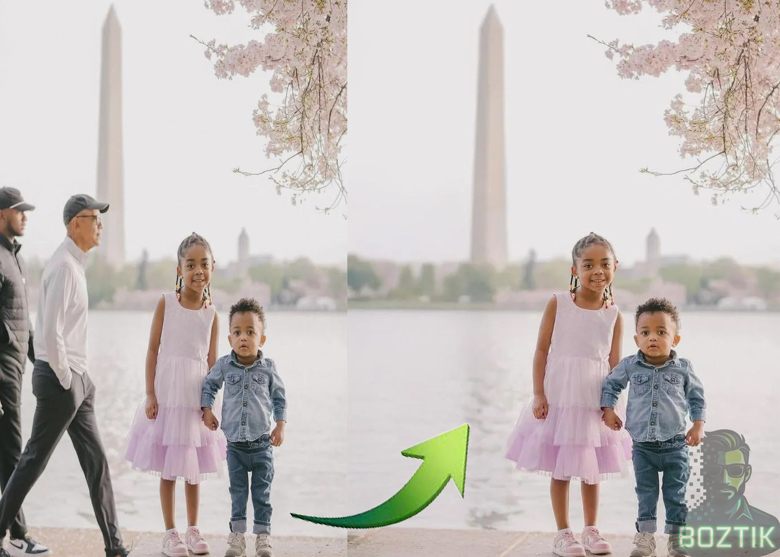
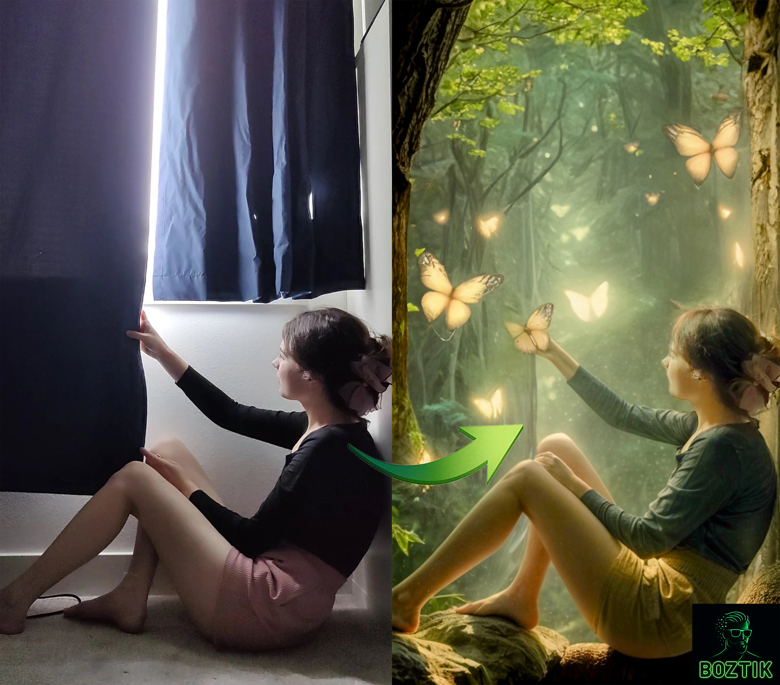
Three examples of restoration, object removal and compositing. In each image the original is on the left and the edited result is on the right; the portfolio has more.
Time-limited links, no account required, and no public gallery. Finished files reach only the person they're meant for — the moment the work is done.
The latest update adds new creative tools and improvements designed to make image research, analysis and everyday creative workflows faster and easier.
Free browser extension for Chrome and Microsoft Edge. Installed copies update automatically through the browser's extension store.
Image Inspector, image research, color palette & font tools, page capture, and an AI Creative Assistant — the full list of features lives on the Creative Toolkit page.
Explore all the features →Two free tools that run in your browser on this site — no install and no account needed.
Inspect your own images in the browser: resolution, file size, color palette, and rough sharpness and exposure estimates. Files stay on your device.
Launch ToolQuick answers on Photoshop workflow, Firefly prompts and export settings — or connect your own AI key for live replies.
Open AssistantInstall the extension in seconds and bring professional creative analysis to your everyday browsing.
Install from the official Chrome Web Store and keep everything automatically updated.
Install from Microsoft Edge Add-ons and enjoy the same fast, polished experience.
Practical notes on restoration, retouching and editing.
What actually gets fixed in a damaged photograph — scratches, fading, missing detail — and why over-restoring is its own mistake.
Read the guide → RetouchingWhy object removal is really a reconstruction problem, and what makes a removal look invisible instead of obvious.
Read the guide →Boztik started with hands-on photo editing and restoration work — the toolkit grew out of the exact problems that work kept creating.
Editing images day to day, the recurring pain points became clear: repetitive analysis, slow asset review, and constant tab-switching.
Boztik brings the tools creators use most into one calm, lightweight browser experience.
The tools are meant for photographers, designers and anyone who regularly inspects or edits images — free to use, with no account needed.
Get real editing work done, or install the free toolkit and try it yourself — either way, it starts here.